STATUS: Released! Update U-SYNC by running the U-SYNC installer, and update your Nome FW using the Firmware Update Tool.
(updating your Nome FW from the current U-SYNC Daemon will work but it will not be able to recognize the new FW so it will give you an error - despite the update being successful)
The main feature is U-SYNC 2.0, which is a hell of an improvement! Among many other thing, it now comes with a Windows version.
More info on https://simntonic.com/pages/u-sync-changelog
As well as the new U-SYNC Manual
And this Youtube video: https://www.youtube.com/watch?v=V2_G4pqVTBU
[RELEASED] U-SYNC 2.0 & Firmware 6.0
-
simntonic
- Posts: 124
- Joined: 27 Jan 2026, 10:01
[RELEASED] U-SYNC 2.0 & Firmware 6.0
Sim'n Tonic Support
-
amaeland
- Posts: 28
- Joined: 11 Jul 2023, 22:38
Re: [RELEASED] U-SYNC 2.0 & Firmware 6.0
Exciting news, Simon! A couple of questions:
-Is the (U)sync actually tighter than before?
-Does the latency autodetection replace the need to manually specify the DAW's audio buffer setting? (Presumably one will have to recalibrate after changing the buffer size, or does the plugin calculate the new latency automatically if you've already calibrated once?)
Also, an idea:
I saw a comment to your 2.0 release video about whether the Nome can do a similar thing to the Expert Sleepers Usamo...I'm sure you know how the ES midi interfacing works with audio to MIDI -- maybe this could be an idea for a hardware expansion module to the Nome? I.e. an audio input expansion that receives a MIDI data stream encoded as audio from the DAW, decode it to MIDI in the Nome hardware and send it to one of the DIN outs? (Maybe having an extra DIN out on the expansion would be cool if there was room for it as well.)
The Nome is already fantastic, but being able to send sample accurate notes from the DAW piano roll to hardware devices would take things to the next level. The problem with the Expert Sleepers solution is that you need one audio channel per MIDI channel, as far as I know (guess things quickly get messy if trying to encode too much data into a single audio stream).
Maybe you need to build a Mega Nome that can take 8 or even 16 channels of audio over USB, decode to MIDI in the hardware and route them to the Mega Nome's MIDI outs, with flexible routing options via a plugin so it's easy to save routing presets? How killer is that!
Andrew Ostler's audio to MIDI idea is genius, but at least when I used his products they weren't very user friendly. If you can crack that, you have a winner.
-Is the (U)sync actually tighter than before?
-Does the latency autodetection replace the need to manually specify the DAW's audio buffer setting? (Presumably one will have to recalibrate after changing the buffer size, or does the plugin calculate the new latency automatically if you've already calibrated once?)
Also, an idea:
I saw a comment to your 2.0 release video about whether the Nome can do a similar thing to the Expert Sleepers Usamo...I'm sure you know how the ES midi interfacing works with audio to MIDI -- maybe this could be an idea for a hardware expansion module to the Nome? I.e. an audio input expansion that receives a MIDI data stream encoded as audio from the DAW, decode it to MIDI in the Nome hardware and send it to one of the DIN outs? (Maybe having an extra DIN out on the expansion would be cool if there was room for it as well.)
The Nome is already fantastic, but being able to send sample accurate notes from the DAW piano roll to hardware devices would take things to the next level. The problem with the Expert Sleepers solution is that you need one audio channel per MIDI channel, as far as I know (guess things quickly get messy if trying to encode too much data into a single audio stream).
Maybe you need to build a Mega Nome that can take 8 or even 16 channels of audio over USB, decode to MIDI in the hardware and route them to the Mega Nome's MIDI outs, with flexible routing options via a plugin so it's easy to save routing presets? How killer is that!
Andrew Ostler's audio to MIDI idea is genius, but at least when I used his products they weren't very user friendly. If you can crack that, you have a winner.
-
simntonic
- Posts: 124
- Joined: 27 Jan 2026, 10:01
Re: [RELEASED] U-SYNC 2.0 & Firmware 6.0
Hi 
Yes U-SYNC is tighter than before. Jitter went down from 0.3µs to 0.05µs, the clock now sticks to the DAW transport more accurately.
As written in the [url=https://manuals.simntonic.com/nome-ii/c ... he-latency]U-SYNC manual[/url, in most DAWs the buffer size should not affect the latency. In some DAWs (in particular on Windows), it was too difficult to detect so changing the buffer size will indeed require to readjust the latency. We removed the setting anyways in the plugin because it was confusing users.
Conclusion is: it should be fine, but if you can, always use the same buffer size
And thanks for your idea - adding MIDI Notes to U-SYNC has been in the pipeline for a while. Hopefully it will be part of the next U-SYNC release
Simon
Yes U-SYNC is tighter than before. Jitter went down from 0.3µs to 0.05µs, the clock now sticks to the DAW transport more accurately.
As written in the [url=https://manuals.simntonic.com/nome-ii/c ... he-latency]U-SYNC manual[/url, in most DAWs the buffer size should not affect the latency. In some DAWs (in particular on Windows), it was too difficult to detect so changing the buffer size will indeed require to readjust the latency. We removed the setting anyways in the plugin because it was confusing users.
Conclusion is: it should be fine, but if you can, always use the same buffer size
And thanks for your idea - adding MIDI Notes to U-SYNC has been in the pipeline for a while. Hopefully it will be part of the next U-SYNC release
Simon
Sim'n Tonic Support
-
musiclife321
- Posts: 2
- Joined: Yesterday, 12:01
Re: [RELEASED] U-SYNC 2.0 & Firmware 6.0
Good Morning! Thank you all for your help and support!
I apologize i know i posted on facebook and emailed support, but one of the announcement posts instructed us to post here so I just want to share my issues incase anyone else is experiencing the same and looking for help
“ the issue with the recent update i believe is a code error with Logic AU plugin, but i am no expert :
installing new U-sync 2.0 with Logic..all seems to install well, but Logic plugin fails validation and the plugin now won’t show in logic. when trying to revalidate it it gives this error below. I uninstalled and reinstalled multiple times with same result. I also looked to see if iI can install an earlier version as now it won’t load previous projects bc the USync plugin won’t load in any projects. (I am able to open old projects, but immediately hit with missing USYNC plugin error and the plugin does not show in my plugins list, only as a failed validation in the Logic Pro Plugin Manager) I have to my knowledge using the Usync installer , uninstalled the drivers and plugins and reinstalled multiple times with same results
a screenshot from my phone for some reason it too large a file to attach, so i have posted the exact results from the Logic Pro Plugin Manager Validation Rescan test most notable the “AU Generators can not have input buses line” I am no expert and i know chatgpt isn’t but with some assistance it seems it could be a code error, but i am unsure! I hope this helps :
Manufacturer String: U-SYNC
AudioUnit Name: U-SYNC
Component Version: 2.0.0 (0x20000)
** PASS
TESTING OPEN TIMES:
COLD:
Time to open AudioUnit:
575.443 ms
WARM:
Time to open AudioUnit:
2.935 ms
This AudioUnit is a version 2 implementation.
FIRST TIME:
Time for initialization: 0.030 ms
* * PASS
VERIFYING DEFAULT SCOPE FORMATS:
Input Scope Bus Configuration:
Default Bus Count:2
ERROR: AU Generators cannot have input buses
Output Scope Bus Configuration:
Default Bus Count: 1
Bus Name: Output
Default Format: AudioStreamBasicDescription: 2 ch, 44100 Hz, Float32, deinterleaved
Has Channel Layouts: 0x640001 0x650002 0x660002 0x670002 0x6A0002
Default Layout:
Tag=0x650002, Num Chan Descs=0
** FAIL
AU VALIDATION FAILED: CORRECT THE ERRORS ABOVE.
validation result: failed validation
I apologize i know i posted on facebook and emailed support, but one of the announcement posts instructed us to post here so I just want to share my issues incase anyone else is experiencing the same and looking for help

“ the issue with the recent update i believe is a code error with Logic AU plugin, but i am no expert :
installing new U-sync 2.0 with Logic..all seems to install well, but Logic plugin fails validation and the plugin now won’t show in logic. when trying to revalidate it it gives this error below. I uninstalled and reinstalled multiple times with same result. I also looked to see if iI can install an earlier version as now it won’t load previous projects bc the USync plugin won’t load in any projects. (I am able to open old projects, but immediately hit with missing USYNC plugin error and the plugin does not show in my plugins list, only as a failed validation in the Logic Pro Plugin Manager) I have to my knowledge using the Usync installer , uninstalled the drivers and plugins and reinstalled multiple times with same results
a screenshot from my phone for some reason it too large a file to attach, so i have posted the exact results from the Logic Pro Plugin Manager Validation Rescan test most notable the “AU Generators can not have input buses line” I am no expert and i know chatgpt isn’t but with some assistance it seems it could be a code error, but i am unsure! I hope this helps
:Manufacturer String: U-SYNC
AudioUnit Name: U-SYNC
Component Version: 2.0.0 (0x20000)
** PASS
TESTING OPEN TIMES:
COLD:
Time to open AudioUnit:
575.443 ms
WARM:
Time to open AudioUnit:
2.935 ms
This AudioUnit is a version 2 implementation.
FIRST TIME:
Time for initialization: 0.030 ms
* * PASS
VERIFYING DEFAULT SCOPE FORMATS:
Input Scope Bus Configuration:
Default Bus Count:2
ERROR: AU Generators cannot have input buses
Output Scope Bus Configuration:
Default Bus Count: 1
Bus Name: Output
Default Format: AudioStreamBasicDescription: 2 ch, 44100 Hz, Float32, deinterleaved
Has Channel Layouts: 0x640001 0x650002 0x660002 0x670002 0x6A0002
Default Layout:
Tag=0x650002, Num Chan Descs=0
** FAIL
AU VALIDATION FAILED: CORRECT THE ERRORS ABOVE.
validation result: failed validation
-
simntonic
- Posts: 124
- Joined: 27 Jan 2026, 10:01
Re: [RELEASED] U-SYNC 2.0 & Firmware 6.0
Thanks for sharingmusiclife321 wrote: ↑Yesterday, 12:26 I apologize i know i posted on facebook and emailed support, but one of the announcement posts instructed us to post here so I just want to share my issues incase anyone else is experiencing the same and looking for help
Please see my replies here https://www.facebook.com/groups/simnton ... 7522927291
Long story short: the failed AU validation is normal, but we did not expect Logic to show it (unless specifically asked) or give any issues with it. You should be able to enable the plugin either way.
Simon
Sim'n Tonic Support
-
spacialrob
- Posts: 47
- Joined: 25 Oct 2022, 21:23
- Location: Milwaukee, WI
- Contact:
Re: [RELEASED] U-SYNC 2.0 & Firmware 6.0
Hey, Simon!
I ran a successful 10-hour endurance test syncing a Boomerang III looper using U-Sync 2.0 on Nome I, Win 11 in FL26! Rock solid timing—0 jitter/drift. Well done!
There are a couple of comments/questions I had running this specific setup:
1) In FL, I don’t seem to have the option to auto-detect latency. Furthermore, the two latency sliders I am given don’t seem to have a real effect on audio recording latency. When I record the audio from FL’s native metronome against audio from a hardware sequencer (a Beatbuddy Drum Machine), the Beatbuddy is always late by a tiny yet not on-the-grid amount. Adjusting either of the sliders one way or another doesn't bring them into alignment. I have FL's PDC settings set to "automatic" and "compensate automations."
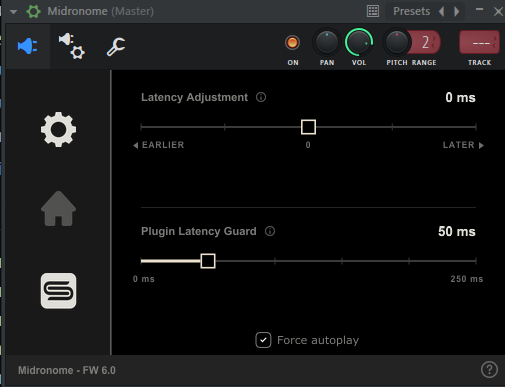
2) Related to above- could this be due to the event scheduling timing for MIDI Start? To that effect, is there a way to somehow adjust the timing of just the Start command, so that it sends it a bit earlier to align the click with the BB?
Fwiw, I've tried these steps: https://manuals.simntonic.com/nome-ii/c ... alibration already.
Thanks!
------------------------------------
UPDATE/EDIT:
I figured it out. Reading a little more about the difference between recording latency and monitoring latency helped, since what I was hearing was not matching with what I saw after recording. My solution was to add -40ms Manual PDC to the Insert with FL's Metronome tick, so now when I play, it's in time. Then I used U-Sync to align the recorded audio to get the best of both worlds. Might help someone to know down the line encountering the same thing.
I ran a successful 10-hour endurance test syncing a Boomerang III looper using U-Sync 2.0 on Nome I, Win 11 in FL26! Rock solid timing—0 jitter/drift. Well done!
There are a couple of comments/questions I had running this specific setup:
1) In FL, I don’t seem to have the option to auto-detect latency. Furthermore, the two latency sliders I am given don’t seem to have a real effect on audio recording latency. When I record the audio from FL’s native metronome against audio from a hardware sequencer (a Beatbuddy Drum Machine), the Beatbuddy is always late by a tiny yet not on-the-grid amount. Adjusting either of the sliders one way or another doesn't bring them into alignment. I have FL's PDC settings set to "automatic" and "compensate automations."
2) Related to above- could this be due to the event scheduling timing for MIDI Start? To that effect, is there a way to somehow adjust the timing of just the Start command, so that it sends it a bit earlier to align the click with the BB?
Fwiw, I've tried these steps: https://manuals.simntonic.com/nome-ii/c ... alibration already.
Thanks!
------------------------------------
UPDATE/EDIT:
I figured it out. Reading a little more about the difference between recording latency and monitoring latency helped, since what I was hearing was not matching with what I saw after recording. My solution was to add -40ms Manual PDC to the Insert with FL's Metronome tick, so now when I play, it's in time. Then I used U-Sync to align the recorded audio to get the best of both worlds. Might help someone to know down the line encountering the same thing.
Last edited by spacialrob on 16 Oct 2026, 20:18, edited 3 times in total.
-
musiclife321
- Posts: 2
- Joined: Yesterday, 12:01
Re: [RELEASED] U-SYNC 2.0 & Firmware 6.0
Just for update sake I decided to update my mac ios to Golden Gate 27.0.1 and logic pro 12.4 and it’s back working. Logic passed validation and I opened an older project (that previously would not load the USYNC plugin) and the new version was sitting in its place as expected. Some other company plugins i use are not available/compatible now (as expected with OS updates) but i will troubleshoot those later just an FYI/reminder for anyone wanting to upgrade, but there all systems are go. Thanks for all your help